





L1400 How To Guide

Quick Setup Guide
L1400 Smart Desktop Terminal
PAX TECHNOLOGY AUSTRALIA (PTA)
1. Checklist
Congratulations on receiving your PAX Technology payment terminal. We do hope you enjoy it! The box you have just opened should contain the following items:
- 1 x PAX L1400 Smart Desktop Terminal
- 1 x Power Adapter
- 1 x AC Power Cable
- 1 x Mounting Plate (optional)
- 1 x T3400 HUB (optional)
- 4 x Mounting Screws and Thumb Nuts
2. Product Description

Figure 1: Front View

Figure 2: Back View

Figure 3: Top View

Figure 4: Bottom View

Figure 5: Left View

Figure 6: All-Side View
3. Installation
1) Station
- Type-C port: Connect Power Adapter/ Hub/ USB device.
- 8pinPogopin Port: Connect Tablet device.
- 6pinPogopin Port: Connect D135 device.
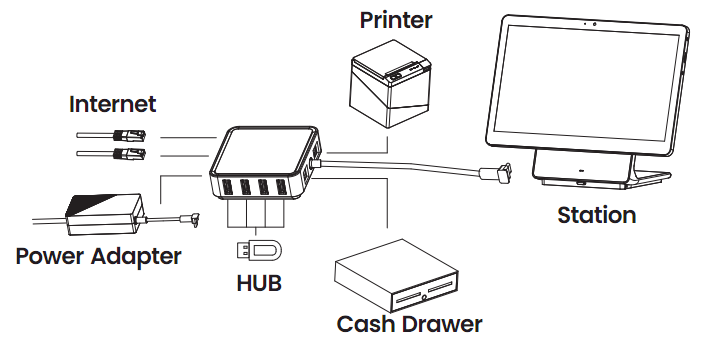
2) Power Adapter and Hub

Figure 7: How It Works 1

Figure 8: How It Works 2
3) Mounting Plate Installation
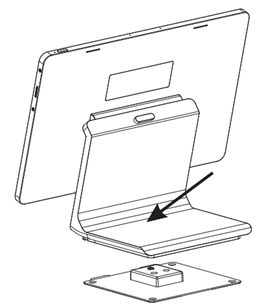
Tear off the tape on the back of the mounting plate and stick it to the table or fix it to the table with the 4 supplied screws.
Place the station vertically against the mounting plate, then firmly press the area pointed by the arrow and the station will be automatically locked to the mounting plate.
4) Mounting Plate Removal
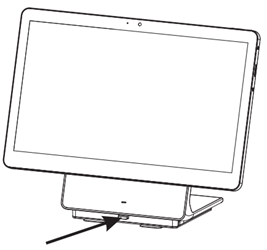
To remove the station, press the button pointed by the arrow and pick up the station vertically.
4. Instructions
- Power ON/OFF
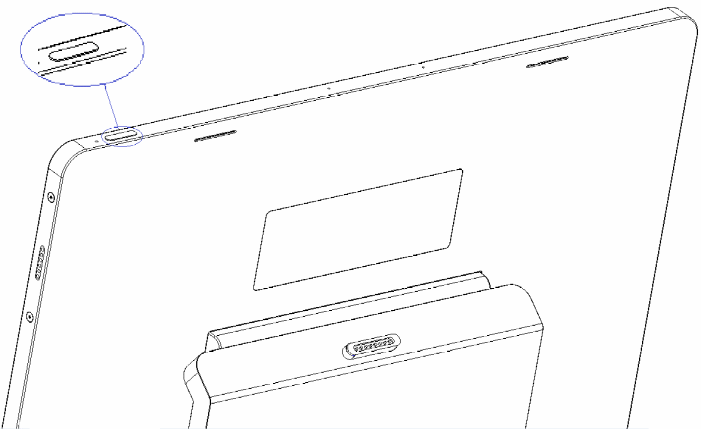
- Power on: Press and hold the Power button (on the top) for three seconds until the main screen displays normally.
- Power off: Press and hold the Power button (on the top) for three seconds until the shutdown menu appears, tap “Shutdown”, and then shutting...”appears. The terminal will be turned off after a few seconds.
5. Specification
- Operation System: Android™ 11
Android is a trademark of Google LLC. - CPU: Qcta-core, 2.0GHz processor
- Memory: 4GB RAM + 64GB Flash Memory
- Display: 14 inch, resolution: 1920*1080, multi-touch capacitive touch screen
- Audio: Built-in dual speaker/Built-in dual MIC
- Fingerprint: Side finger ID
- Camera: 5 mega-pixel auto-focusing camera
- Wireless Communication: Support Wi-Fi®2.4/5G,Bluetooth® 5.0
- Peripheral Ports: 2*Type-C ports, 1*8PIN Pogopin port, 1*6PIN Pogopin port
6. Cleaning the Device
- Do not use industrial strength or abrasive cleaner as it may damage or scratch the screen.
- Do not immerse the device in water or liquid.
- Do not spray water or cleaner into EMV Card Reader or ports.
- To clean the screen, apply distilled water or mild glass cleaner onto a soft, lint-free cloth and gently wipe the terminal.
7. Important Safety Warning
- Do not place the terminal or battery in direct sunlight, nor in environments with excessively high temperatures, smoke, dust, or dampness.
- Do not attempt to disassemble the battery, nor insert or use foreign objects to penetrate the casing. Never place the battery in a fire or excessively hot surfaces. Take care not to drop the battery. Excessive external shocks or pressure could cause battery liquid leakage or result in the battery catching fire or even exploding. Keep the battery well away from children and animals.
- Immediately replace any battery which appears to be deformed, expanded or in an overheated state.
- We recommend you only use power adaptors supplied by PAX Technology Australia (PTA). If you must use 3rd party supplier accessories, please ensure specifications meet exactly those recommended for our products, which must comply with international and local regulations & standards. Non-compatible power supplies, chargers or batteries could cause fires or even explosions, and will invalidate any product warranty.
- Charge the battery when the indicator level is low, but make sure to never charge a battery continuously for more than 24 hours. If a battery is not used for a long time, please charge it at least once every 6 months to avoid overcharge or discharge damage. For long-term optimal product performance, it is recommended that a battery be replaced after 2 years of continual usage.
- When disposing of the device, battery, or accessories, please do so responsibly and according to local regulations. These are not household waste items. Improper disposal of the battery could cause a fire or explosion, and any liquid leakage could be damaging to the environment and toxic to humans & animals.
8. Icons
Dispose in a professional recycling manner
Class II equipment
For indoor use only
Energy efficiency marking
AC voltage
DC voltage
Trademark notice:
“The Bluetooth® word mark and logos are registered trademarks owned by Bluetooth SIG, Inc. and any use of such marks by PAX Technology Australia (PTA) is under license. Other trademarks and trade names are those of their respective owners.”
PAX Technology Australia (PTA)
Supplier: PAX Technology Australia (PTA)
Address: Level 5, 26 Talavera Road, Macquarie Park, NSW 2113, Australia
Tel: +61 413 841 534
Support: swsupport@paxtech.com.au
Website: www.paxtech.com.au
PAX Technology Australia (PTA) continually invests to maintain its high-quality products up to date with the latest certifications; therefore a comprehensive list can be requested via the website's contact form or on downloadable product brochures.