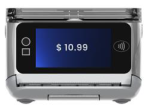






A920Pro How To Guide

Quick Setup Guide
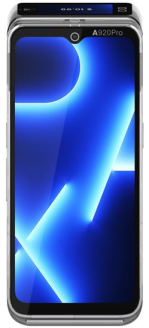
A920Pro Smart Mobile Payment Terminal
(This document is intended for professional cashiers, not consumers)
PAX TECHNOLOGY AUSTRALIA (PTA)
1. Checklist
Congratulations on receiving your PAX Technology payment terminal. We do hope you enjoy it! The box you have just opened should contain the following items:
• 1 x PAX A920Pro Smart Mobile Payment Terminal
• 1 x Thermal Paper Roll
• 1 x AC Power Adapter
• 1 x Battery
• 1 x 2-in-1 Magnetic + Type-C cable
2. Product Description


3. Installation

USB Port: connect to a USB-enabled device.
SAM/SIM/microSD Cards:
a) Open the battery cover underneath the terminal.
b) Remove the battery.
c) Insert SAM/SIM/microSD cards into the corresponding card slots.
4. Instructions
- Power On/Off: Power On: press and hold the Power button for 5 seconds until the LCD lights on, showing that the terminal is being turned on.
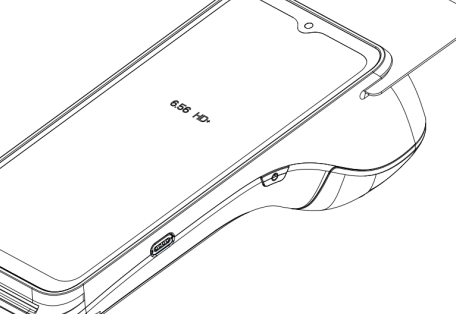
Power Off: press and hold the Power button for 3 seconds until the shutdown menu appears, tap Power Off > Click Power Off, and “Shutting Down” will appear. - Contactless Transactions: Tap a contactless enabled card or smartphone in proximity to the top end of the terminal where the contactless sensor is located, indicated by the contactless icon.
- Chip Card Transactions: With the card's chip facing upwards, insert the chip card fully into the chip card slot.
- Magnetic Stripe Transactions: With the card's magnetic stripe facing downwards, swipe the card through the magnetic reader at a constant speed, in either direction.
- Paper Receipts: Tear off the receipt at a 45-degree angle to the paper cutter.
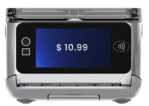
- Battery Charging: With a charging cable connected, the device's charging status shows on the display.
5. Important Safety Warning
- Do not place the terminal or battery in direct sunlight, nor in environments with excessively high temperatures, smoke, dust, or dampness.
- Do not attempt to disassemble the battery, nor insert or use foreign objects to penetrate the casing. Never place the battery in a fire or excessively hot surfaces. Take care not to drop the battery. Excessive external shocks or pressure could cause battery liquid leakage or result in the battery catching fire or even exploding. Keep the battery well away from children and animals.
- Immediately replace any battery which appears to be deformed, expanded or in an overheated state.
- We recommend you only use power adaptors supplied by PAX Technology Australia (PTA). If you must use 3rd party supplier accessories, please ensure specifications meet exactly those recommended for our products, which must comply with international and local regulations & standards. Non-compatible power supplies, chargers or batteries could cause fires or even explosions, and will invalidate any product warranty.
- Charge the battery when the indicator level is low, but make sure to never charge a battery continuously for more than 24 hours. If a battery is not used for a long time, please charge it at least once every 6 months to avoid overcharge or discharge damage. For long-term optimal product performance, it is recommended that a battery be replaced after 2 years of continual usage.
- When disposing of the device, battery, or accessories, please do so responsibly and according to local regulations. These are not household waste items. Improper disposal of the battery could cause a fire or explosion, and any liquid leakage could be damaging to the environment and toxic to humans & animals.
- Please use PAX adaptor and cable for better battery result and device life.
- For a better experience,it's recommended to replace the battery if it has been used for more than 2 years.
6. Working Mode Tips
- A920Pro has BMS (Battery management system) function to protect the lithium battery from being over-charged, so A920Pro can work either on Desktop mode or Mobile Mode (Select “Settings” > “Battery” > “More Settings” > ”Power Supply Work Mode”).
- Desktop Mode
The terminal is mainly powered by external power supply, which includes charging base, power adapter and wireless charging.
- Mobile Mode
The terminal is mainly powered by battery, and generally no external power is inserted.
- We specify different charging and discharging parameters for the two working modes, as detailed below.

- The device is restricted to indoor use only when operating in the 5150 to 5350 MHz frequency range.

7. Terminal Installation and Usage Tips
- If any cables become damaged, seek a replacement.
- Do not insert unknown materials into any port on the A920Pro, as this may cause serious damage.
- If repairs are required, please contact a professional technician instead of attempting them on your own.
- Avoid exposing the device to an excessively hot, dusty, or strong electromagnetic environment.
- Do not vibrate, shake, or drop the device.
8. Icons
Dispose in a professional recycling manner
Class II equipment
For indoor use only
Energy efficiency marking
AC voltage
DC voltage
microSD logo
Trademark notice:
“microSD logo is a trademark of SD-3C LLC.”
PAX Technology Australia (PTA)
Supplier: PAX Technology Australia (PTA)
Address: Level 5, 26 Talavera Road, Macquarie Park, NSW 2113, Australia
Tel: +61 413 841 534
Support: swsupport@paxtech.com.au
Website: www.paxtech.com.au
PAX Technology Australia (PTA) continually invests to maintain its high quality products up to date with the latest certifications, therefore a comprehensive list can be requested via the website's contact form or on downloadable product brochures.